
"Is there a way to move my captures from the workspace to my personal area?"
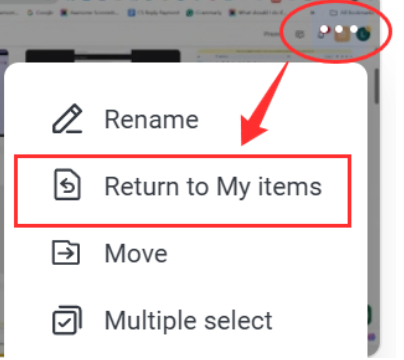
A. For items you created, click "Return to My Items".
B. For items created by other team members, click "Return to Author" if you have (available only if you have permission).
A. For items you created, click "Return to My Items".
- Hover your mouse over the item thumbnail
- Click the three-dot icon
- Select "Return to My Items" from the dropdown menu
B. For items created by other team members, click "Return to Author".
- Hover your mouse over the item thumbnail
- Click the three-dot icon
- Select "Return to Author" from the dropdown menu
Relevant instructions:
Awesome Screenshot Workspace Roles and Permissions